

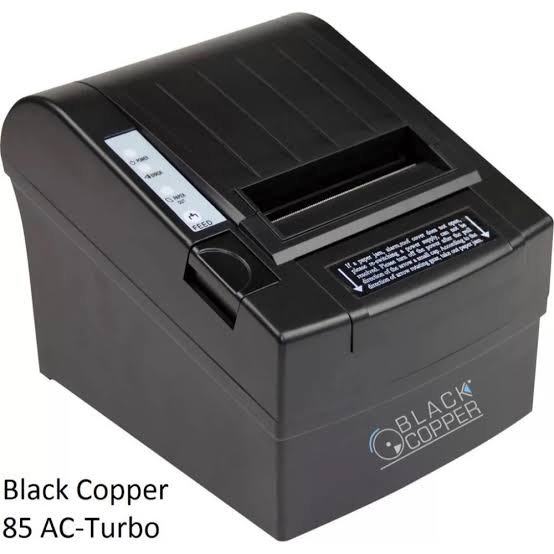
Thermal printing plays an important role in many industries, including retail, logistics, healthcare, hospitality, and manufacturing. Businesses rely on thermal printers to produce receipts, shipping labels, product identification tags, tickets, and other essential documents. As printing requirements become more specialized, selecting the right manufacturing partner is increasingly important for maintaining consistent performance and efficient operations.
A professional Thermal Printer Manufacturer should offer more than a range of printing devices. Buyers should evaluate manufacturing capabilities, product reliability, technical expertise, customization options, and after-sales support before making a purchasing decision. Understanding these factors can help businesses identify suppliers that meet their current requirements while providing flexibility for future growth.
1. Understand Your Specific Printing Requirements
The first step in selecting a manufacturer is identifying how the printers will be used. Different business environments require different printing technologies, specifications, and equipment designs.
For example, a retail store may need fast receipt printing, while a distribution center may require barcode and shipping label printers capable of handling large daily workloads.
Consider the following requirements:
- Printing application and document type
- Daily printing volume
- Required print width and resolution
- Operating environment
- Media and paper compatibility
- Connectivity requirements
- Available installation space
Having a clear list of requirements makes it easier to compare manufacturers and avoid purchasing equipment with unnecessary or insufficient features.
2. Evaluate the Manufacturer’s Product Range
A professional manufacturer should provide suitable printing solutions for different applications. A diverse product portfolio can help businesses find equipment that matches their operational needs.
Common product categories include:
Direct Thermal Printers
Direct thermal printers use heat-sensitive paper or labels to create printed images without ink or toner. They are frequently used for receipts, tickets, shipping labels, and other applications where long-term image permanence is not essential.
Thermal Transfer Printers
Thermal transfer printers use a heated printhead and ribbon to transfer ink onto compatible materials. They are suitable for labels that require greater resistance to environmental conditions or longer-lasting identification.
Receipt Printers
These printers are designed for point-of-sale environments such as retail stores, supermarkets, restaurants, and service counters.
Barcode and Label Printers
Barcode printers produce labels used for inventory identification, product tracking, packaging, and shipping operations.
Portable Thermal Printers
Portable models are designed for mobile applications, allowing employees to print documents while working away from fixed workstations.
Reviewing the available product range helps determine whether a manufacturer can support multiple printing applications as business requirements evolve.
3. Examine Manufacturing Experience
Manufacturing experience can indicate how familiar a company is with product development, component sourcing, assembly, and production management.
An established manufacturer may have developed processes for handling technical specifications, maintaining production consistency, and responding to customer requirements.
However, experience should be assessed alongside other factors. Consider the company’s engineering capabilities, relevant industry knowledge, product history, and ability to explain its manufacturing procedures.
Ask whether the manufacturer has supplied equipment for applications similar to yours. Relevant experience can make product selection and technical communication more straightforward.
4. Check Product Quality and Durability
Product quality directly affects printing consistency and equipment reliability. Printers used in busy business environments must withstand regular operation and repeated handling.
Important quality considerations include:
- Printhead construction and expected service life
- Paper-feeding mechanism
- Internal component quality
- Housing strength
- Printing consistency
- Operating temperature range
- Media handling capabilities
- Ease of maintenance
A professional manufacturer should have defined procedures for inspecting components and testing finished equipment.
Requesting product samples can also help buyers assess construction quality and practical performance before committing to a larger order.
5. Review Printing Speed and Resolution
Printing speed and resolution influence how effectively a printer handles different workloads.
Print speed is generally measured in millimeters per second (mm/s) for many thermal printers. Faster models may be useful in supermarkets, restaurants, warehouses, and other environments where printing delays can interrupt workflows.
Resolution is commonly measured in dots per inch (DPI). Many receipt and label applications use 203 DPI, while more detailed labels may benefit from 300 DPI or higher.
The correct combination depends on the intended application. Businesses should consider whether the printer can maintain consistent output at the required speed and resolution rather than evaluating these specifications separately.
6. Assess Connectivity Options
Modern printing equipment must often communicate with computers, POS terminals, mobile devices, and network-based business systems.
A professional manufacturer should offer suitable connectivity options for the intended application.
Common interfaces include:
- USB for direct connections to computers and compatible devices
- Ethernet for network-based printing
- Bluetooth for wireless communication with supported mobile devices
- Wi-Fi for wireless network integration
- Serial interfaces for certain industrial and legacy systems
Before purchasing, confirm that the printer supports the required interfaces and that compatible cables, drivers, and configuration tools are available.
7. Confirm Software and Operating System Compatibility
Hardware performance alone does not guarantee successful integration. Thermal printers must also work with the software platforms used by the business.
Check whether the manufacturer provides drivers and documentation for the required operating systems. Also review support for common printer command languages, development kits, and application integration.
This is particularly important for businesses using customized POS systems, warehouse management software, shipping platforms, or enterprise resource planning applications.
Clear technical documentation can help developers configure devices and reduce the time required for installation.
8. Investigate Quality Assurance and Testing Standards
A professional manufacturer should follow consistent quality assurance procedures throughout production.
Quality checks may take place at several stages, including incoming component inspection, assembly, functional testing, and final product verification.
Ask about testing procedures for:
- Printhead operation and print clarity.
- Paper feeding and cutting mechanisms.
- Connectivity and communication.
- Supported paper and label specifications.
- Power supply and electrical performance.
- Continuous operation under specified conditions.
- Packaging and shipment preparation.
Businesses can also request information about relevant quality management certifications and testing standards. Any certification claims should be checked against the issuing organization’s records when necessary.
9. Consider Customization and OEM/ODM Services
Standard printer models may meet many business requirements, but some applications need specialized configurations.
Manufacturers with OEM or ODM capabilities may offer customization depending on their engineering resources and production arrangements.
Potential customization options include:
- Product housing and appearance
- Logo placement and branding
- Interface configurations
- Firmware settings
- Paper and label handling
- Packaging design
- Product documentation
- Specialized mounting arrangements
Before starting a customized project, clarify development costs, sample approval procedures, minimum order quantities, production schedules, and technical responsibilities.
10. Evaluate Research and Development Capabilities
Printing technology continues to develop alongside wireless communication, cloud computing, mobile applications, and business automation.
A manufacturer’s research and development capabilities can indicate its ability to improve existing products and respond to new market requirements.
Look for evidence of engineering resources, product testing facilities, firmware development, and ongoing product improvements.
It is also useful to ask whether the manufacturer can adapt its designs to support new interfaces, updated software environments, or specialized printing applications.
11. Review Technical Support and After-Sales Service
Technical support becomes especially important when printers are used in daily business operations.
A professional manufacturer should provide clear information about installation, configuration, troubleshooting, maintenance, and warranty procedures.
Before selecting a supplier, investigate whether it offers:
- Product manuals and setup guides
- Driver and firmware downloads
- Technical assistance
- Troubleshooting documentation
- Warranty services
- Replacement components
- Repair guidance
Responsive after-sales support can help businesses resolve problems efficiently and reduce unnecessary equipment downtime.
12. Compare Pricing and Long-Term Operating Costs
Price is an important purchasing factor, but the lowest quotation does not always represent the best value.
Businesses should evaluate the total cost of ownership, including the initial purchase price and expenses associated with operating and maintaining the equipment.
These costs may include:
- Thermal paper and label materials
- Thermal transfer ribbons
- Replacement printheads
- Maintenance and repair
- Software integration
- Energy consumption
- Technical support
- Shipping and installation
Compare quotations using equivalent specifications, warranty coverage, and service conditions. This provides a more accurate picture of the value offered by each manufacturer.
13. Request Samples and Conduct Practical Testing
Product samples help businesses evaluate equipment before making bulk purchasing decisions.
Testing should reflect actual operating conditions as closely as possible. For example, a retail business should test receipt printing through its POS software, while a warehouse should evaluate barcode readability and label handling.
During sample testing, examine:
- Print quality and consistency
- Actual printing speed
- Paper-loading convenience
- Barcode scanning performance
- Connection stability
- Software compatibility
- Noise and operating behavior
- Ease of routine maintenance
Sample evaluation can reveal potential limitations that may not be obvious from product descriptions or specification sheets.
14. Examine Production Capacity and Lead Times
Manufacturing capacity is particularly important for distributors, wholesalers, and businesses placing large or recurring orders.
A supplier should be able to explain its production arrangements, estimated lead times, order scheduling, and shipping procedures.
Ask whether it can maintain consistent product specifications across multiple production batches. This is important when businesses need replacement units or additional equipment over time.
It is also useful to discuss how the manufacturer handles sudden increases in demand, component shortages, and unexpected production delays.
15. Check Supply Chain and Component Management
Printer reliability depends partly on the quality and availability of internal components.
Manufacturers must manage suppliers for printheads, motors, circuit boards, power supplies, rollers, and other parts.
A professional company should have procedures for evaluating incoming components and managing potential supply disruptions.
Buyers can ask about component sourcing, inspection practices, replacement part availability, and procedures for maintaining product consistency.
A stable supply chain can help manufacturers meet production schedules and support customers after delivery.
16. Consider Industry-Specific Expertise
Different industries use thermal printers in different ways. A manufacturer familiar with a particular sector may better understand its practical requirements.
For example:
- Retail: Fast receipt printing and POS integration.
- Logistics: Shipping labels, barcodes, and warehouse identification.
- Healthcare: Patient wristbands, specimen labels, and pharmacy documentation.
- Hospitality: Kitchen orders, payment receipts, and service tickets.
- Manufacturing: Product identification, component tracking, and batch labels.
Discussing the intended application with a potential supplier can help identify suitable equipment and avoid technical mismatches.
17. Review Warranty Conditions and Replacement Parts
Warranty coverage provides important information about how a manufacturer handles certain product defects and service requirements.
Before ordering, review the warranty period, covered components, exclusions, repair procedures, and responsibilities for transportation costs.
Replacement part availability should also be considered. Components such as printheads, rollers, and power supplies may eventually need servicing.
A manufacturer that provides clear warranty documentation and a practical parts supply arrangement can make long-term equipment management easier.
18. Assess Communication and Business Transparency
Professional communication helps buyers understand product specifications, pricing, production schedules, and service conditions.
Pay attention to how a manufacturer responds to technical questions and whether its representatives provide consistent information.
A reliable supplier should be willing to explain product limitations, clarify quotation details, and communicate realistic delivery estimates.
Be cautious of unclear specifications, unexplained price changes, unrealistic promises, or reluctance to provide product samples.
Transparent communication helps establish clear expectations before an order is placed.
19. Look for Long-Term Partnership Potential
Selecting a manufacturer should involve considering future business requirements as well as immediate purchasing needs.
As a company expands, it may need additional printer models, higher production volumes, customized equipment, or new software integrations.
A supplier with flexible production capabilities and consistent technical support may be able to accommodate these changes.
Evaluate the manufacturer’s willingness to maintain product consistency, support repeat orders, communicate product updates, and respond to changing requirements.
A well-managed partnership can simplify procurement and help businesses maintain a dependable printing infrastructure.
20. Use a Structured Manufacturer Evaluation Process
Comparing potential manufacturers against the same criteria can make the selection process more objective.
Businesses can create an internal evaluation checklist covering the most important technical and commercial factors.
| Evaluation area | What to examine |
|---|---|
| Product range | Suitable printer models and applications |
| Manufacturing quality | Component inspection and product testing |
| Technical specifications | Speed, resolution, and media compatibility |
| Connectivity | USB, Ethernet, Bluetooth, and Wi-Fi options |
| Software support | Drivers, documentation, and integration |
| Customization | OEM/ODM and specialized configurations |
| Pricing | Purchase cost and total operating expenses |
| Production | Capacity, lead times, and order consistency |
| After-sales service | Warranty, technical assistance, and spare parts |
| Communication | Clear quotations and realistic commitments |
This approach helps purchasing teams identify strengths, weaknesses, and potential risks before selecting a supplier.
Conclusion
Selecting a professional thermal printer manufacturer requires careful evaluation of product quality, technical expertise, manufacturing capacity, software compatibility, customization options, and after-sales support. Businesses should begin with clearly defined printing requirements and compare potential suppliers using consistent technical and commercial criteria.
Sample testing, transparent communication, verified quality procedures, and clear warranty terms can further reduce purchasing risks. By considering long-term operating costs and future business needs, organizations can choose a manufacturing partner that supports reliable printing, efficient workflows, and sustainable operational growth.
