

Retail and hospitality businesses are increasingly using self-service technology to improve customer convenience and streamline everyday operations. From ordering meals to checking out purchases, automated kiosks can handle many routine tasks while reducing pressure on employees.
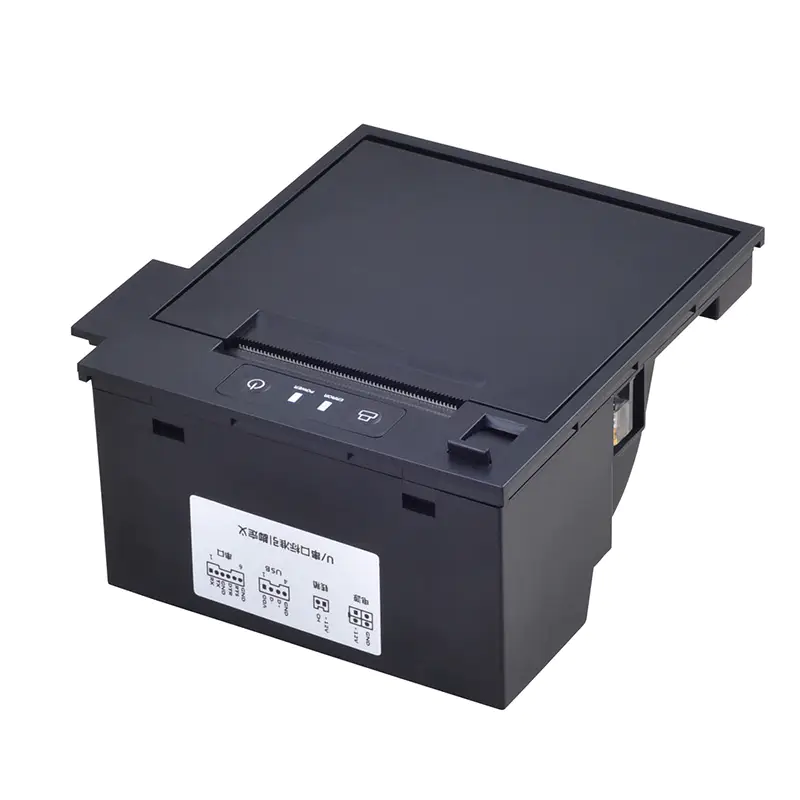
A Thermal Kiosk Printer plays an important role in these systems by producing receipts, order slips, tickets, queue numbers, and other physical records. Its compact structure and fast output make it suitable for kiosks where space is limited and customers expect immediate results.
Role of Thermal Printers in Self-Service Systems
A kiosk printer is designed to work as part of a larger automated system rather than as a standalone office printer. It receives print commands from the kiosk’s software and produces the required information on thermal paper.
Because direct thermal printing does not require ink cartridges or toner, the mechanism can remain relatively compact. This is particularly useful for equipment that must accommodate touchscreens, computers, payment terminals, scanners, and other components.
Retail Applications of Thermal Kiosk Printers
Retail environments offer many opportunities for self-service printing. Stores can integrate thermal printing into kiosks to provide customers with transaction-related information without requiring assistance from staff.
Self-Checkout Receipts
Self-checkout stations can use thermal printing mechanisms to produce purchase receipts after customers complete payment.
Fast receipt production helps keep the checkout process moving, particularly during busy shopping periods.
Order Collection Slips
Retailers offering click-and-collect services can use kiosks to print collection numbers or confirmation slips. Customers can present these documents when collecting their purchases.
This approach can make the collection process more organized while providing customers with a physical reference.
Price and Product Information
Some retail kiosks allow shoppers to search for products, compare options, or access additional information. A printer can provide a small printed summary when a physical record is useful.
Queue Management
Large retail stores and service counters may use queue systems to issue numbered tickets. A thermal printer can quickly produce these tickets while taking up minimal space inside the kiosk.
Hospitality Applications
Hotels, restaurants, cafés, entertainment venues, and other hospitality businesses also benefit from compact thermal printing systems.
Restaurant Ordering Kiosks
Self-ordering kiosks can allow customers to select meals and complete payments without interacting directly with a cashier.
After an order is submitted, the kiosk can print a receipt, order number, or customer copy. This gives the customer a physical reference while the digital order is sent to the kitchen or management system.
Hotel Self-Service Kiosks
Hotels can use self-service kiosks for check-in and other guest services. A printer can produce registration confirmations, transaction receipts, room-related documents, or other information required during the process.
Parking and Guest Services
Hospitality facilities often integrate parking and visitor management systems with automated kiosks. Thermal printing can provide parking tickets, payment records, or confirmation slips.
Event and Entertainment Venues
Cinemas, museums, amusement facilities, and entertainment centers can use kiosks to issue tickets or transaction records. Fast printing is especially useful when many visitors need service within a short period.
Benefits for Retail and Hospitality Businesses
Thermal kiosk printing offers several operational advantages when properly integrated into self-service equipment.
Fast Printing
Customers typically expect kiosks to respond quickly. Thermal mechanisms can produce short documents at high speed, helping maintain an efficient user experience.
Compact Design
Kiosk interiors have limited space. A compact printer mechanism can be integrated without taking up excessive room that may be needed for other hardware.
Low Consumable Requirements
Direct thermal printing uses heat-sensitive paper rather than ink or toner. This eliminates the need for ink cartridge replacement and simplifies consumable management.
Reduced User Intervention
Automated paper feeding, paper detection, and cutting features can allow the printer to operate with minimal customer interaction.
Easy System Integration
Depending on the model, kiosk printers can support interfaces suitable for embedded systems. This allows them to communicate with the kiosk’s computer or controller.
Considerations for High-Traffic Locations
Retail and hospitality kiosks can experience significant variations in usage. A printer installed in a busy restaurant may produce hundreds of receipts or order slips during peak periods.
For these environments, businesses should consider expected print volume, paper capacity, operating temperature, print speed, and maintenance requirements.
A printer that performs well under continuous or repeated use can help reduce interruptions and improve overall kiosk availability.
Paper and Print Quality
Thermal paper quality has a direct effect on printed output. Paper should be compatible with the printer’s supported dimensions and thermal characteristics.
Clear printing is important when receipts contain order numbers, transaction details, barcodes, or other information that customers or employees need to read or scan.
Businesses should also consider how long printed documents need to remain legible. Different applications may have different requirements for storage and record keeping.
Integration With Digital Systems
Modern retail and hospitality kiosks often connect with point-of-sale platforms, inventory systems, payment solutions, ordering software, or customer management platforms.
The printer becomes one part of this larger workflow. When an order or transaction is completed, the system can automatically send the appropriate print commands.
Reliable communication between the software and printer is therefore important. Compatibility should be evaluated before deployment to avoid integration problems.
Maintenance and Operational Reliability
Regular maintenance helps keep kiosk printers operating consistently. Operators should monitor paper supplies, remove paper debris, and address warning messages promptly.
In high-use environments, easy access to the paper roll and printing mechanism can make routine servicing more efficient.
Features such as paper-out detection and jam detection can also help staff identify problems quickly instead of leaving customers with an incomplete transaction.
Choosing a Printer for Retail or Hospitality
Before selecting a thermal kiosk printer, businesses should evaluate the specific application rather than focusing on a single specification.
Key factors include:
- Required paper width
- Printing speed
- Daily print volume
- Available installation space
- Communication interface
- Cutter requirements
- Paper roll capacity
- Power consumption
- Environmental conditions
- Maintenance accessibility
The printer should also be compatible with the kiosk’s physical design and software architecture.
Future of Kiosk Printing
As self-service technology continues to expand, thermal printing is likely to remain useful where customers still need physical receipts, tickets, or transaction records.
Even as businesses adopt digital receipts and mobile confirmations, physical printing can provide an accessible backup and support applications where a printed ticket or slip is operationally necessary.
Conclusion
Thermal kiosk printers support a wide range of retail and hospitality applications, from self-checkout receipts and restaurant order slips to hotel confirmations and event tickets. Their compact design, fast output, and simple consumable requirements make them well suited to automated environments.
By considering print volume, paper requirements, system compatibility, installation space, and maintenance needs, businesses can choose a printing solution that supports efficient and reliable self-service operations.
