

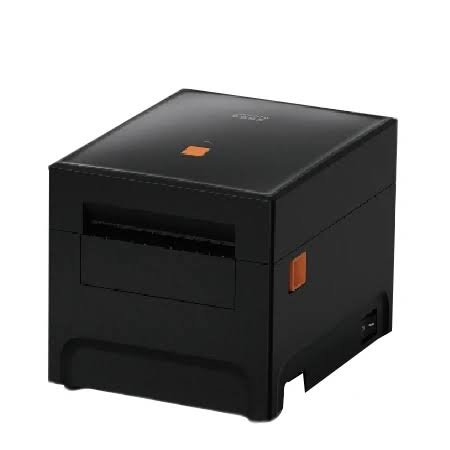
Selecting the right receipt printing equipment is an important decision for businesses that depend on efficient transaction processing. Retail stores, restaurants, supermarkets, pharmacies, and service providers all require dependable printing solutions to produce transaction records and support their point-of-sale (POS) operations. The quality of these devices can influence checkout speed, maintenance requirements, and the overall customer experience.
Choosing a suitable supplier involves more than comparing product prices. Businesses should evaluate manufacturing capabilities, product quality, technical support, customization options, and long-term reliability. Working with an experienced Receipt Printer Manufacturer can help organizations identify equipment that matches their operational requirements and provides consistent performance over time.
1. Evaluate Manufacturing Experience and Industry Knowledge
A manufacturer’s experience can provide useful insight into its understanding of receipt printing technology and commercial requirements. Companies with established manufacturing operations may have developed processes for designing, producing, testing, and improving different printer models.
However, years in business alone do not guarantee product quality. Buyers should also examine the manufacturer’s product range, technical expertise, industry applications, and history of serving different business sectors.
Useful questions include:
- How long has the company manufactured receipt printers?
- Which industries does it commonly serve?
- Does it produce thermal, impact, or specialized printing equipment?
- Can it explain the technical differences between its models?
- Does it have experience supporting international customers?
These details can help businesses distinguish between suppliers with genuine manufacturing expertise and companies that primarily resell products.
2. Examine the Product Range
Different businesses have different printing requirements. A small shop may need a compact desktop printer, while a supermarket or restaurant may require equipment designed for frequent printing and continuous operation.
A reliable manufacturer should offer products suitable for a range of applications. Common categories include:
Desktop Thermal Receipt Printers
These printers are widely used in retail stores, restaurants, and service counters. They are generally compact and produce receipts using heat-sensitive paper.
Mobile Receipt Printers
Portable models support businesses that process transactions away from fixed checkout stations. They are useful in delivery services, outdoor sales, and mobile POS environments.
Impact Receipt Printers
Impact printers use ink ribbons and mechanical printing mechanisms. They may be suitable for applications that require multi-part forms or specialized paper handling.
A broader product range gives businesses more flexibility when selecting equipment for different locations or transaction environments.
3. Assess Product Quality and Reliability
<AsyncImage query=”thermal receipt printer manufacturing quality inspection production facility” aspectRatio=”16:9″ maxHeight={190}/>
Product reliability is one of the most important factors when choosing a manufacturing partner. Receipt printers often operate throughout the business day, and unexpected failures can interrupt transactions and increase maintenance expenses.
Buyers should examine the quality of major components, including printheads, paper-feeding mechanisms, cutters, circuit boards, and connection interfaces.
It is also useful to investigate how products perform under regular operating conditions. Consistent printing, stable connectivity, accurate paper feeding, and durable construction are all important indicators.
Businesses should request product samples, technical specifications, or demonstration units when possible. Practical testing provides a better understanding of performance than relying exclusively on marketing descriptions.
4. Review Manufacturing Processes and Quality Control
A professional manufacturer should have clearly defined procedures for maintaining product consistency. Quality control needs to take place throughout production rather than only during final inspection.
Typical manufacturing and testing stages may include:
- Component and material inspection.
- Circuit board and mechanical assembly.
- Firmware installation and configuration.
- Printing performance evaluation.
- Connectivity and compatibility testing.
- Final product inspection and packaging.
The specific process varies by manufacturer and product design. Buyers should ask how defects are identified, how production batches are monitored, and what testing is performed before shipment.
Consistent quality control is particularly important for businesses purchasing large quantities of equipment for multiple locations.
5. Compare Technical Specifications
Receipt printers can differ considerably in their technical capabilities. Buyers should compare specifications based on actual operational needs instead of assuming that the highest specifications are always the best choice.
Important factors include:
- Printing speed: Determines how quickly receipts can be produced.
- Print resolution: Influences the clarity of text, symbols, and graphics.
- Paper width: Determines the supported receipt format.
- Interface options: May include USB, Ethernet, Bluetooth, Wi-Fi, or serial connections.
- Paper handling: Includes roll capacity and loading design.
- Cutter performance: Important for models with automatic cutting.
- Operating conditions: Includes supported temperature and humidity ranges.
The manufacturer should provide clear specifications and explain which features are available on each model.
6. Check Compatibility with POS Systems
A receipt printer must communicate effectively with the business’s existing software and hardware. Compatibility problems can cause failed print jobs, incorrect formatting, or interruptions during checkout.
Before placing an order, businesses should confirm support for their POS software, operating systems, drivers, and communication protocols.
They should also ask whether the manufacturer provides software development kits, configuration utilities, installation instructions, or technical documentation where applicable.
For businesses planning to upgrade their POS infrastructure, it is sensible to choose equipment that supports both current and anticipated system requirements.
7. Evaluate Customization and OEM/ODM Capabilities
Some businesses need more than standard printing equipment. Distributors, retail brands, and large organizations may require customized products that match their technical or commercial requirements.
OEM and ODM services can provide different levels of customization. Depending on the manufacturer’s capabilities, options may include:
- Customized exterior colors and product branding.
- Logo printing and packaging design.
- Interface or connectivity configurations.
- Firmware or software adjustments.
- Product specifications for particular applications.
- Customized documentation and accessories.
Buyers should clarify which features can be modified, whether minimum order quantities apply, and how customization affects production costs and delivery schedules.
It is also important to confirm that requested changes will not compromise product reliability or compatibility.
8. Consider Production Capacity and Order Flexibility
A manufacturer must be capable of handling the required order volume within an acceptable timeframe. Small businesses may need only a limited number of devices, while distributors and international retailers may place larger recurring orders.
Production capacity can influence lead times, order consistency, and the supplier’s ability to respond to unexpected demand.
Before choosing a manufacturing partner, buyers should ask about:
- Monthly or annual production capacity.
- Standard and customized order quantities.
- Typical production lead times.
- Seasonal demand management.
- Repeat-order arrangements.
- Procedures for handling urgent requirements.
A supplier with suitable capacity and realistic production commitments can help businesses maintain a more predictable procurement schedule.
9. Investigate Certifications and Compliance Requirements
Receipt printers sold in international markets may need to meet particular safety, electromagnetic compatibility, and environmental requirements.
The relevant standards depend on the destination country, product configuration, and applicable regulations. Buyers should therefore identify which requirements apply to their intended market.
Ask the manufacturer for relevant certificates, test reports, and supporting documentation. Where necessary, verify that these documents correspond to the actual product model being purchased.
Compliance checks are especially important for importers and distributors that sell equipment across multiple countries.
10. Compare Pricing and Total Ownership Costs
<AsyncImage query=”thermal receipt printers arranged on wholesale electronics distribution warehouse shelves” aspectRatio=”16:9″ maxHeight={190}/>
Price is an important purchasing factor, but the lowest quotation does not necessarily represent the best overall value. A printer with a lower initial cost may require more frequent maintenance or lack important compatibility features.
Businesses should compare the complete cost of ownership, including:
- Initial unit price.
- Shipping and import expenses.
- Installation and configuration.
- Thermal paper or ink ribbon requirements.
- Replacement parts and repairs.
- Warranty coverage.
- Technical support costs.
For bulk orders, buyers should also request clear pricing tiers and understand how product specifications, packaging, and customization affect the final quotation.
A transparent manufacturer should explain what is included in the quoted price and identify any additional charges before an order is confirmed.
11. Review Warranty and After-Sales Support
Technical support becomes especially important when printers are used in high-volume business environments. A device failure can delay transactions and affect daily operations.
Before selecting a manufacturer, review its warranty terms and support arrangements. Buyers should understand the warranty period, covered components, exclusions, repair procedures, and replacement policies.
Other useful support services may include:
- Installation and configuration guidance.
- Driver and firmware updates.
- Troubleshooting documentation.
- Spare parts availability.
- Remote technical assistance.
- Product maintenance recommendations.
Businesses purchasing multiple units should also ask how the manufacturer handles recurring faults or issues affecting an entire production batch.
12. Assess Communication and Customer Service
Effective communication is essential when working with an international manufacturing partner. Buyers need clear answers about product specifications, customization, order status, payment terms, and delivery arrangements.
A dependable supplier should respond to technical questions accurately and provide realistic information about production schedules.
During the evaluation process, observe whether the company:
- Provides detailed product information.
- Responds within a reasonable timeframe.
- Explains technical limitations clearly.
- Supplies accurate quotations and documentation.
- Communicates production or shipping changes promptly.
Good communication can reduce misunderstandings and make long-term purchasing relationships easier to manage.
13. Examine Shipping, Packaging, and Export Experience
Receipt printers contain electronic and mechanical components that need suitable protection during transportation. Packaging quality can affect whether products arrive in good condition, particularly during international shipments.
Businesses should ask about individual product packaging, carton specifications, protective materials, and shipping arrangements.
Importers should also clarify shipping terms, customs documentation, insurance responsibilities, and estimated delivery schedules.
A manufacturer with export experience may be better prepared to coordinate international orders and provide the documents required by distributors or customs authorities.
14. Request Samples and Check Customer References
Product samples allow buyers to assess equipment before committing to a large order. A sample can be tested with the business’s POS software and used to evaluate print quality, connection stability, paper loading, and general operation.
Where possible, buyers should also request references or examples of previous projects involving similar industries or order volumes.
Customer feedback can provide additional information about product consistency, technical support, delivery performance, and the supplier’s ability to resolve problems.
It is important to evaluate references carefully and consider whether the reported experience is relevant to the intended application.
15. Build a Long-Term Manufacturing Partnership
Selecting a manufacturer should be viewed as a long-term business decision rather than a one-time purchasing transaction. A stable relationship can make future orders, product updates, customization, and technical support easier to manage.
Businesses should consider whether a supplier can support changing requirements as their operations expand. For example, a company may initially purchase basic desktop printers but later require mobile devices, network-connected models, or customized equipment.
Regular communication, clear agreements, consistent quality standards, and transparent problem-solving practices help establish a productive partnership.
Conclusion
Choosing a reliable receipt printer manufacturer requires careful evaluation of product quality, technical expertise, production capabilities, customization services, and after-sales support. Businesses should also examine POS compatibility, compliance requirements, pricing, and international delivery arrangements before making a purchasing decision.
Requesting samples, reviewing technical documentation, and testing products under realistic operating conditions can reduce purchasing risks. By focusing on long-term performance rather than initial price alone, businesses can identify a manufacturing partner capable of supporting their printing requirements as their operations develop.
