

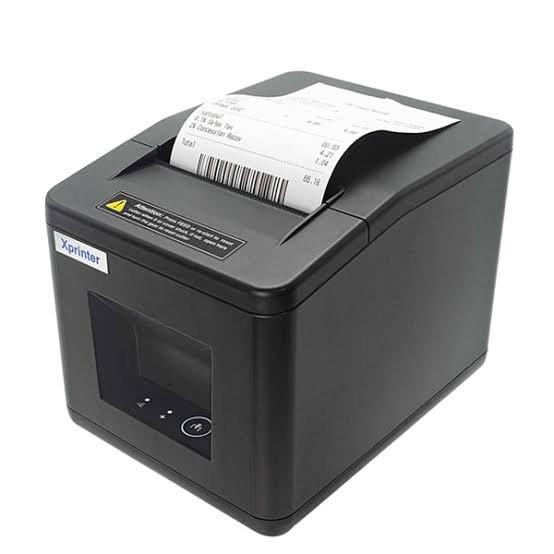
Receipt printing technology has changed considerably as businesses have adopted digital point-of-sale systems and automated payment processes. Traditional printing solutions, including impact printers and older receipt-producing devices, have supported commercial transactions for many years. However, modern businesses increasingly require equipment that can provide efficient printing, flexible connectivity, and straightforward maintenance.
Choosing between modern thermal printing equipment and traditional receipt printing solutions depends on transaction volume, document requirements, operating costs, and system compatibility. An Xprinter Receipt Printer can offer features suited to contemporary business environments, but understanding the differences between printing technologies is essential before making a purchasing decision.
1. Understanding Traditional Receipt Printing Solutions
Traditional receipt printing commonly refers to impact-based printing systems, particularly dot matrix printers. These devices use a print head containing small pins that strike an ink ribbon against paper to create text and graphics.
Impact printers have been used in retail stores, restaurants, financial institutions, and other commercial environments. One of their important characteristics is their ability to print on certain multi-part forms, making them useful when businesses need duplicate or triplicate documents.
Despite their continued relevance in specialized applications, traditional impact printers may involve additional maintenance because they use ribbons and mechanical components that experience wear during operation.
2. Understanding Modern Xprinter Receipt Printing Technology
Modern receipt printers commonly use direct thermal printing technology. Instead of striking an ink ribbon against paper, a thermal print head applies controlled heat to specially coated paper to produce text and images.
This process eliminates the need for traditional ink cartridges or ribbons. It also supports compact printer designs and can produce receipts quickly, depending on the model’s specifications.
Modern thermal printing equipment is commonly integrated with POS terminals, computers, and compatible mobile devices. These capabilities make it suitable for businesses that need efficient transaction documentation and straightforward printing workflows.
3. Printing Speed and Transaction Efficiency
Printing speed is an important consideration for businesses that process frequent customer transactions. Delays at checkout can affect service efficiency, particularly during busy periods.
Thermal receipt printers generally offer faster output than many traditional impact-based systems. Since they do not need to physically strike an ink ribbon against the paper, they can produce receipts efficiently with fewer mechanical printing movements.
This can be beneficial for:
- Supermarkets handling numerous daily transactions
- Restaurants processing customer bills and kitchen orders
- Convenience stores serving customers continuously
- Retail outlets operating multiple checkout counters
- Service businesses generating frequent payment records
However, actual performance varies by model, paper specifications, receipt content, and operating conditions. Businesses should compare rated printing speeds rather than relying only on the printing technology.
4. Print Quality and Readability
Receipt readability is important because customers and employees use printed documents to verify transaction details. Product names, prices, taxes, and payment information must be easy to understand.
Thermal printers can produce sharp text and clear graphics when used with compatible thermal paper and properly maintained print heads. They are suitable for many standard receipt formats, including itemized bills and payment confirmations.
Traditional impact printers can also produce readable text, but their output may appear less refined depending on ribbon condition, print-head quality, and paper type.
The appropriate choice depends on the document’s purpose. Businesses printing standard customer receipts may prefer thermal output, while operations requiring carbon-copy documents may still benefit from impact technology.
5. Maintenance Requirements and Consumable Costs
Maintenance is another important difference between modern thermal and traditional impact printing solutions.
Thermal receipt printers do not require ink ribbons or toner cartridges. Businesses only need compatible thermal paper and appropriate maintenance supplies. This can simplify routine operations and reduce the number of consumables that employees must monitor.
Traditional impact printers require replacement ribbons as their ink becomes depleted. Their mechanical printing mechanisms may also require additional inspection and servicing.
| Comparison factor | Thermal receipt printers | Traditional impact printers |
|---|---|---|
| Printing method | Heat-sensitive paper | Print head strikes an ink ribbon |
| Ink or ribbon | Not required | Ribbon required |
| Paper type | Thermal paper | Compatible ordinary or multipart paper |
| Maintenance | Print-head and paper-path cleaning | Ribbon replacement and mechanical inspection |
| Printing noise | Generally quieter | Generally noisier |
| Multi-copy documents | Generally not designed for this purpose | Suitable for compatible multipart forms |
| Typical applications | POS receipts and customer bills | Duplicate forms and specialized records |
Actual maintenance expenses depend on usage frequency, equipment quality, and local consumable prices.
6. Connectivity and POS System Compatibility
Modern businesses increasingly depend on connected POS systems to manage sales, payments, inventory, and customer records. Receipt printers must communicate reliably with these systems to receive transaction information.
Depending on the model, modern receipt printers may support USB, serial, Ethernet, Bluetooth, or Wi-Fi connections. These options provide different installation possibilities for fixed checkout counters, networked workstations, and mobile POS environments.
Traditional impact printers may also support computer and POS connections, but their available interfaces can vary significantly between older and newer models.
Before selecting equipment, businesses should confirm compatibility with their operating systems, POS applications, printer drivers, and supported communication protocols.
7. Paper Compatibility and Document Requirements
Paper compatibility is one area where traditional and modern printing technologies serve different purposes.
Thermal receipt printers require specially coated paper that reacts to heat. This paper is commonly available in different widths and roll sizes, allowing businesses to choose formats appropriate for their receipt layouts.
Impact printers use compatible paper and can support multi-part forms in certain configurations. This makes them useful for applications where several copies of a document must be created simultaneously.
Businesses should consider the type of document they need to produce. Standard customer receipts generally work well with thermal printing, while delivery records, order forms, and other duplicate documents may require impact printing.
8. Noise Levels and Workplace Environment
The printing mechanism can influence the noise produced during operation. Impact printers create sound because their print heads physically strike ribbons and paper.
Thermal printers generally operate more quietly because their printing process does not rely on the same impact mechanism. This can be useful in retail counters, hotel reception areas, clinics, and other customer-facing environments.
Reduced operating noise can contribute to a more comfortable workplace, especially when printing equipment is positioned close to employees or customers.
9. Durability and Long-Term Operational Considerations
Both thermal and impact printers can provide reliable service when used appropriately. However, their long-term performance depends on design, workload, environmental conditions, and maintenance.
Thermal printers contain components such as print heads, feed mechanisms, and cutters that may experience wear over time. The print head can also be affected by poor-quality paper, dirt, and improper cleaning.
Impact printers have mechanical components that require regular attention, including print pins, ribbons, and feeding mechanisms.
When comparing equipment, businesses should review the manufacturer’s technical specifications, expected workload, warranty terms, maintenance instructions, and availability of replacement parts.
10. Which Printing Solution Is Better for Different Businesses?
There is no single printing technology that suits every commercial application. The correct choice depends on the business’s document requirements and operating environment.
Retail Stores and Supermarkets
Thermal receipt printers are generally suitable for standard sales receipts because they offer quick output, quiet operation, and straightforward consumable management.
Restaurants and Cafes
Thermal printers can support customer billing and kitchen order printing. Businesses should select models compatible with their restaurant POS software and printing workflow.
Healthcare Facilities
Clinics and pharmacies can use thermal printers for payment records and transaction summaries. Clear output and reliable software integration are important considerations.
Warehouses and Distribution Operations
Some warehouses require duplicate forms or specialized transaction documents. Impact printing may remain useful where multipart paper is necessary, although dedicated label printers may be more appropriate for product and shipping labels.
Financial and Administrative Offices
Businesses that need multiple physical copies of forms may prefer impact-based systems. For standard payment receipts, thermal printing can provide a more convenient alternative.
11. Key Factors to Consider Before Replacing Traditional Printers
Businesses planning to upgrade their receipt printing equipment should evaluate their existing workflow before purchasing new devices.
Important considerations include:
- Printing requirements: Determine whether the business needs standard receipts or duplicate documents.
- Transaction volume: Estimate daily printing frequency and peak workload.
- Connectivity: Check whether the printer supports existing POS terminals and network infrastructure.
- Paper availability: Confirm that compatible paper is readily available.
- Operating costs: Compare consumable expenses, maintenance needs, and expected service life.
- Software compatibility: Verify driver support and integration with current business applications.
- Installation requirements: Consider available counter space, power connections, and mounting arrangements.
A careful assessment helps prevent compatibility issues and ensures that the selected technology meets actual business needs.
Conclusion
Xprinter receipt printers and traditional receipt printing solutions serve similar purposes but use different technologies and offer different operational advantages. Modern thermal printers are generally well suited to standard POS receipts because they support fast printing, quieter operation, and simpler consumable management. Traditional impact printers remain relevant for applications that require duplicate forms or printing on compatible multipart paper.
Businesses should evaluate their document requirements, transaction volume, connectivity needs, and maintenance expectations before selecting a solution. Understanding these differences makes it easier to choose printing equipment that supports efficient operations and reliable transaction documentation.
