

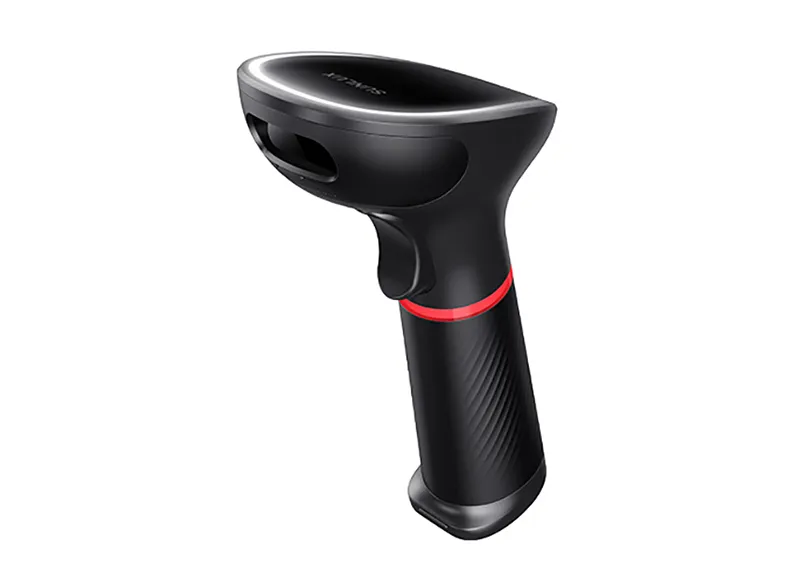
A POS system is rarely made up of a single device. Modern checkout environments often combine terminals, barcode scanners, receipt printers, payment devices, customer displays, cash drawers, and other peripherals. For these components to work effectively, reliable communication between devices is essential.
Connectivity and compatibility should therefore be considered before purchasing POS hardware. Businesses exploring integrated solutions such as ComPOSxb can use these factors as part of a broader evaluation of how different hardware components are expected to operate together.
What Connectivity Means in a POS Environment
Connectivity refers to the methods POS devices use to communicate with the main system or with one another. Depending on the equipment, connections may be wired, wireless, or based on specialized interfaces.
The choice of connectivity can affect installation, reliability, flexibility, and workspace organization. Businesses should understand the requirements of each peripheral rather than assuming that all devices use the same connection method.
Common POS Connectivity Options
Different hardware components may support different connection technologies. Some of the most common options include:
- USB: Often used for peripherals such as scanners and receipt printers.
- Ethernet: Provides a wired network connection and can be useful for fixed POS equipment.
- Wi-Fi: Allows compatible devices to connect without physical network cables.
- Bluetooth: Can be useful for selected wireless peripherals and accessories.
- Serial connections: Still found in some specialized or legacy POS equipment.
The most appropriate option depends on the hardware, software, network setup, and physical environment.
Why Peripheral Compatibility Matters
Connectivity alone does not guarantee that two devices will work correctly together. A POS terminal may have the appropriate port but still lack software support for a particular scanner or printer.
Compatibility involves the interaction between hardware, operating systems, drivers, POS applications, and communication protocols. Checking these requirements before purchase can prevent problems during installation.
Barcode Scanner Compatibility
Barcode scanners are common peripherals in retail POS environments. They need to transmit scanned product information accurately to the POS application.
Businesses should check whether the scanner is supported by the selected system and whether its connection method is appropriate for the terminal. Wireless scanners may provide additional flexibility, while wired models can offer a straightforward fixed connection.
Receipt Printer Integration
Receipt printers also require proper communication with POS software. Businesses should verify supported printer models, connection types, operating systems, and printing protocols.
A compatible printer can receive transaction information automatically, reducing the need for employees to manually transfer data between systems.
Payment Device Connectivity
Payment terminals require particular attention because they handle an important stage of the checkout process. The payment device must communicate appropriately with the POS environment while supporting the required payment methods.
Businesses should confirm integration requirements before selecting payment hardware. This can help avoid situations where a payment device technically connects to the system but does not properly interact with the POS application.
Cash Drawer Connections
Cash drawers are often connected directly to receipt printers or POS terminals, depending on the configuration. The connection needs to support the POS software’s instructions for opening the drawer at the appropriate point in a transaction.
Businesses should check the supported connection method and hardware configuration before purchasing a cash drawer separately from the main POS equipment.
Customer Displays and Additional Peripherals
Customer-facing displays can provide transaction information while a purchase is being processed. Other businesses may use additional peripherals such as scales, signature devices, kitchen printers, or customer feedback hardware.
Every additional device introduces another compatibility consideration. A structured hardware plan can help businesses determine which peripherals are necessary and how they will connect to the core POS system.
Wired vs. Wireless Connections
Both wired and wireless connectivity can be appropriate for POS environments. Wired connections are often preferred for fixed equipment where consistent physical connections are practical.
Wireless technology can provide greater flexibility in environments where employees move around. However, businesses should consider network coverage, interference, security, and device battery requirements when using wireless peripherals.
Planning the Network
Network infrastructure can influence how well connected POS equipment performs. Businesses using multiple terminals or network-dependent peripherals should ensure that their network can support the expected workload.
Reliable network equipment, appropriate placement, and sensible configuration can help reduce communication interruptions. It is also useful to plan how POS devices will remain operational if network connectivity is temporarily unavailable.
Operating System and Software Support
Hardware compatibility can depend heavily on the operating system and POS application. A peripheral that works with one software environment may not necessarily work with another.
Before purchasing equipment, businesses should verify supported operating systems, drivers, software versions, and integration requirements. This is especially important when combining equipment from different manufacturers.
Managing Peripheral Expansion
Businesses may add new peripherals as their operations develop. Additional checkout stations, scanners, printers, payment devices, or customer displays can increase the complexity of the POS environment.
A scalable hardware design makes these additions easier to manage. Businesses should consider available ports, network capacity, software support, and installation requirements before expanding their setup.
Troubleshooting Compatibility Problems
When a peripheral does not work correctly, the cause may involve hardware, software, drivers, network settings, or physical connections.
A systematic troubleshooting process can help identify the issue:
- Check physical or wireless connections.
- Confirm that the device is powered and recognized.
- Review operating system and driver requirements.
- Verify POS software compatibility.
- Check configuration and device settings.
- Test the peripheral independently where possible.
Keeping documentation for each connected device can also make future maintenance easier.
Questions to Ask Before Buying
Businesses can reduce compatibility risks by asking practical questions before purchasing POS equipment:
- Is the peripheral officially supported by the POS software?
- Which connection types does it require?
- Are additional drivers or software needed?
- Can it operate with the existing operating system?
- Is the device suitable for the expected transaction volume?
- Can additional peripherals be connected later?
- What support is available if integration problems occur?
These questions provide a useful starting point for comparing hardware options.
Final Thoughts
Connectivity and peripheral compatibility are essential parts of a dependable POS environment. A system may contain high-quality individual components, but those components still need to communicate effectively to support smooth daily operations.
Businesses should evaluate connection types, software support, operating system requirements, network infrastructure, and future expansion before selecting POS hardware. Taking an integrated approach can help reduce technical complications and create a more reliable checkout environment.
